Quick answer
Indian Bikes Driving 3D is Rohit Gaming Studio's free open-world driving game with Indian bikes, cars and a city to explore. The latest Indian Bikes Driving 3D APK is version 91, updated October 29, 2026, and needs Android 7.1 or newer. It contains ads, has no in-app purchases, and is rated 18+ in India.
| App name | Indian Bikes Driving 3D |
|---|---|
| Developer | Rohit Gaming Studio |
| Latest version | 91 |
| Updated | Oct 29, 2026 |
| Requires Android | 7.1 and up |
| Package name | com.Rohit.IndianBikes |
| Category | Simulation |
| Price | Free |
| Contains ads | Yes |
| In-app purchases | No |
On this page
What is Indian Bikes Driving 3D?
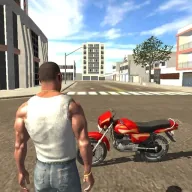
Indian Bikes Driving 3D is an open-world driving game. You start in a city with famous Indian motorbikes and cars, and you can ride, drive, explore, do stunts, and cause chaos however you like. There's no strict story: the fun comes from trying different vehicles, jumping ramps, and experimenting with the city's sandbox.
Published by Rohit Gaming Studio in December 2020, the game became a viral hit, especially in India, and has passed 100 million downloads on Google Play. It's one of the simulation games we list. We read its details from the Indian Google Play store.
What's new in Indian Bikes Driving 3D v91
The latest Indian Bikes Driving 3D APK on Google Play is version 91, updated on October 29, 2026. The release notes on Play list:
- City changes.
- Bug fixes.
Rohit Gaming Studio updates the game often with new vehicles and changes to the city.
Key features
Open-world city
Explore a city with roads, highways, ramps and buildings, on foot or by vehicle. There's no time limit, so you can play for a few minutes or an hour.
Indian bikes and cars
Ride popular Indian motorbikes and drive cars, trucks and other vehicles, many inspired by famous real models.
Vehicle codes
A built-in phone lets you type number codes to spawn vehicles and items instantly. Players share lists of codes online, and finding new ones is part of the fun.
Stunts and physics
Jump ramps, flip bikes and try stunts. The physics are arcade-style rather than realistic, which makes experimenting easy.
Offline play
The game works offline, so you can play anywhere.
Tips for new players
- Learn the controls first. Practise steering and braking on quiet roads before trying stunts.
- Try different vehicles. Each bike and car handles differently, and some are much faster.
- Use the map. Find ramps and open areas for stunts.
- Look up official codes. Codes are a built-in feature; you only need the in-game phone.
- Close other apps. On older phones, closing background apps helps the game run smoothly.
How to install Indian Bikes Driving 3D APK on Android
The easiest option is Indian Bikes Driving 3D on Google Play.
- Check that your phone runs Android 7.1 or newer.
- Open Google Play, search for Indian Bikes Driving 3D, and make sure the developer is Rohit Gaming Studio.
- Tap Install, then open the game.
- Link the game to an account in its settings, if it offers one, so your progress is saved if you change phones.
Without Google Play, install the official game carefully: get it only from Google Play or the developer, allow your browser or file manager to Install unknown apps when Android asks, then turn that permission off again under Settings → Apps → Special app access → Install unknown apps. Online games need the latest version, so outside Play you'll have to update by hand. APKPeer currently links to Google Play only and doesn't host a file for this game.
Is Indian Bikes Driving 3D APK safe?
The official Indian Bikes Driving 3D from Google Play is safe. It's published by Rohit Gaming Studio, rated 18+ in India for extreme violence, contains ads, and has no in-app purchases.
- Copycat games. Many games use almost the same name and icon, often with more aggressive ads. Check that the developer is Rohit Gaming Studio and the package name is com.Rohit.IndianBikes.
- Age rating. The 18+ rating in India is for violence. Younger players are attracted by the bright graphics, so parents should decide whether it's suitable.
- Ads. Ads appear during play. Turning off mobile data reduces them, though you may lose some features.
- Unofficial versions. Modified versions claiming to remove ads or add vehicles aren't from the developer and can carry malware. The built-in codes already unlock vehicles for free.
Indian Bikes Driving 3D vs alternatives
- Car Parking Multiplayer offers open-world driving with online multiplayer and car customisation.
- Bus Simulator Indonesia is a more realistic driving simulator with online convoys.
- GTA: San Andreas is a full open-world action game with a story, for older players.
Indian Bikes Driving 3D is a simple, free sandbox that's easy to enjoy. Just make sure you install the original game, and keep the age rating in mind for younger players.
Version history
Indian Bikes Driving 3D 91Latest
Frequently asked questions
How do I install Indian Bikes Driving 3D on Android?
Open Google Play, search for Indian Bikes Driving 3D and check the developer is Rohit Gaming Studio before tapping Install. It needs Android 7.1 or newer. It's free to install, and Play keeps it updated automatically. Avoid copies from other sites: they aren't from Rohit Gaming Studio and may be altered, so the safest way to play Indian Bikes Driving 3D is the official listing.
Is Indian Bikes Driving 3D free?
Yes. Indian Bikes Driving 3D is free to play and contains ads. Google Play shows no in-app purchases for it.
Why is Indian Bikes Driving 3D rated 18+?
Google Play in India rates the game 18+ for extreme violence, because you can fight and cause chaos in the open world. Despite its cartoonish look and popularity with younger players, parents should check the rating.
How do vehicle codes work in Indian Bikes Driving 3D?
The game has a built-in phone where you can type number codes to spawn bikes, cars and other vehicles. Lists of codes are shared widely online, and the codes are an official feature of the game, so you don't need any extra apps to use them.
Who makes Indian Bikes Driving 3D?
The original game is published by Rohit Gaming Studio on Google Play, with the package name com.Rohit.IndianBikes. Several other games use almost the same name, so check the developer before installing.