
Finding a useful Android app should not mean giving up your privacy. Many apps collect data, show ads, or depend on services you may not want. F Droid takes a different path by focusing on free and open-source software, often called FOSS apps.
The project has been around since 2010 and has grown into a community-run app distribution system for Android. Its goal is simple: help people find software they can inspect, use, and change without depending on a normal commercial app store.
That makes it interesting for privacy-minded Android users, developers, people using custom ROMs, and anyone who wants more control over their phone.
This guide explains what the platform does, its main features, how to install and use it, its safety model, its limits, and the alternatives worth knowing. By the end, you should have a clear idea of whether it fits your Android setup.
What Is F Droid?
F Droid is a community-driven Android app platform that focuses on free and open-source software. It offers apps whose source code is available for review, with many packages built from that code before being distributed through its repository. This makes it a useful option for Android users who care about transparency and control.
Unlike mainstream app stores, F Droid puts more emphasis on privacy and user freedom. You can browse and install apps without creating an account, and the project says it does not track the apps you install. If you are also exploring other Android entertainment apps, you may want to learn more about MovieBox and how it compares with different app sources and installation methods.
The project was founded in 2010 by Ciaran Gultnieks and is maintained by volunteers and contributors. It runs on Android phones and works particularly well for people looking for open source Android apps.
As of July 2026, the official client page lists version 2.0-alpha11 as a beta release, requiring Android 7.0 or newer.
Key Features
Free and Open-Source App Catalog
The biggest draw is its focus on free and open-source software. The source code for listed apps is available for people to inspect, build, improve, or study.
This matters because you are not forced to trust a completely closed app. Developers can review the code, while normal users can benefit from software built with openness in mind.
Privacy-Focused App Discovery
Privacy is a major part of the project. The service says users do not need accounts to download apps and that it does not track what they install.
For someone trying to reduce unnecessary data collection, this can make finding privacy-friendly software much easier than checking hundreds of random APK websites.
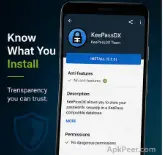
Clear Anti-Feature Labels
Not every open-source app is automatically perfect for privacy. Some can contain advertising, tracking, known vulnerabilities, or other features that users may dislike.
The repository uses Anti-Features to flag these issues. For example, apps can be marked for Ads, Tracking, Known Vulnerability, Non-Free Dependencies, or other concerns. Apps marked with Tracking are hidden by default in the client unless users choose to show them.
Built and Signed Packages
The project does more than simply collect APK files from the internet. Its security model includes source archives, build logs, signed metadata, HTTPS, and APK signing checks.
The official client page also states that listed builds are built and signed by F-Droid and correspond to their published source tarballs.
Large Choice of FOSS Apps
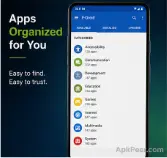
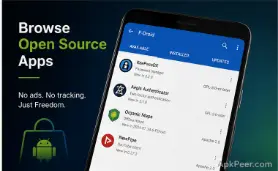
The catalog covers many areas, including browsers, communication, security, utilities, media, education, and developer tools. The official repository currently includes security-focused choices such as KeePassDX, NetGuard, Proton Authenticator, TrackerControl, and other privacy tools.
That variety makes the store useful beyond one specific type of Android user.
Tools for Developers
F Droid is also more than an Android client. Its ecosystem includes server tools, build tools, repository tools, developer documentation, and ways to create additional repositories.
For developers, this makes the project useful as a distribution system rather than simply another place to download apps.
How to Use F Droid — Step by Step
Works on: Android phones and compatible Android devices. Requires: The current 2.0-alpha11 client requires Android 7.0 or newer; older client releases support some earlier Android versions.
- Open the official website. Visit the official F-Droid website rather than a random APK mirror, then choose the download option provided there.
- Download the Android client. Get the current APK from the official source and follow Android’s installation prompts.
- Allow installation when Android asks. If your browser blocks the APK, Android may ask you to allow that browser to install unknown apps.
- Launch the client. Open the app and allow it to refresh its repository data before searching for software.
- Search for an app. Use the search box to find a browser, utility, security tool, or another open-source Android app.
- Read the app details. Check its description, permissions, version history, source information, and any Anti-Features before installing it.
- Install the app. Tap the install option and approve the Android permission prompt if one appears.
- Keep apps updated. Use the client to check for newer releases instead of repeatedly downloading APK files from unrelated websites.
For people exploring FOSS apps, this process is useful because the repository gives you more information about an app than a basic download page.
Pros and Cons
The main advantages are strong privacy goals, open-source software, no account requirement, useful Anti-Feature labels, and a large selection of free Android applications. The project also publishes security information and build details, which gives technically minded users more ways to verify what they install.
There are limits, too. The catalog is smaller and more specialized than Google Play, some apps may have older releases, and certain apps cannot appear because they rely on proprietary components or services. You also need to understand Android’s APK installation process when setting up the client for the first time.
Verdict: It is best suited to Android users who care about privacy, open software, app transparency, and having more control over where their applications come from.
Is F Droid Safe and Legal to Use?
For normal Android use, the official F Droid project is a legitimate software distribution platform, and its security model is designed to reduce the risks linked with downloading APK files. The project publishes source tarballs and build logs, uses signed repository metadata, relies on HTTPS, and provides ways to verify the initial client download.
The project also checks apps for security issues and uses Anti-Features to warn users about problems such as known vulnerabilities or tracking.
That does not mean every app in the catalog is risk-free forever. Software can develop bugs or security problems after release. F Droid itself acknowledges this by labeling known vulnerabilities when they are identified.
The safest approach is to download the client from the official website, keep Android updated, read app permissions, and check the app’s warnings before installation.
From a legal point of view, using an open-source Android app store is generally lawful. However, each app has its own license and terms, so users should respect those rules when copying, modifying, or redistributing software.
Top Alternatives to F Droid
Google Play Store is Android’s main commercial app marketplace and offers a much larger selection, including many proprietary apps. It differs by supporting software that does not meet F-Droid’s free-software requirements.
Aurora Store is an alternative client for accessing Google Play apps without using the standard Play Store interface. It is useful for users who want Play Store software while avoiding some parts of the normal Google Play experience.
IzzyOnDroid is an additional Android repository focused on free and open-source applications. Unlike the main F-Droid repository, it can include some projects that do not meet every requirement for inclusion in the official F-Droid catalog.
The right option depends on whether your priority is app choice, privacy, open-source licensing, or access to Google Play software.
FAQ People Also Ask
Is F Droid free to use?
Yes. The project is free to use, and its catalog focuses on free and open-source Android software. You do not need to pay for the client or create an account simply to download apps. The project also says it does not show ads in its service.
Is F Droid safe for Android phones?
The official project has several security measures, including signed metadata, HTTPS, build information, and checks for known vulnerabilities. Still, no software source can promise zero risk. Download the client from the official website and review app permissions and Anti-Features before installing anything.
Can F Droid replace Google Play?
It can replace Google Play for some users, but not everyone. Its catalog focuses on free and open-source software, so many popular commercial apps are missing. If you depend on banking, streaming, games, or other proprietary apps, you may still need Google Play or another compatible source.
Does F Droid require root access?
No. You do not need root access to install and use the standard Android client. The current official client is distributed as an APK and can run on supported Android devices. Some individual apps may need special permissions, root, or other system features, but that depends on the app itself.
Why are some apps missing from F Droid?
Apps may be missing because they are not free and open source, depend on proprietary services, include restricted components, or do not meet the project’s packaging and policy requirements. The repository also uses Anti-Features to explain certain concerns instead of hiding them without context.
Conclusion
F Droid gives Android users a useful way to discover software with a strong focus on open source, privacy, and user control. Its biggest strength is not simply the number of apps available, but the information and transparency around how many of those apps are built and distributed.
For users who want fewer closed apps and more control over their phone, F Droid is worth trying. Start with the official client, explore a few trusted apps, and read their permissions and warnings before installing.






Leave a Reply