

Millions of people listen to music every day, but finding the right songs, playlists, and podcasts can still feel like a chore. That is one reason Spotify has become one of the most popular audio platforms in the world. It puts millions of tracks, podcasts, and personalized recommendations in one place, making music discovery fast and simple.
Whether you want background music while studying, workout playlists for the gym, or podcasts during your commute, this platform offers tools that fit almost every listening style. It works across phones, tablets, computers, smart TVs, game consoles, and even smart speakers.
This guide explains what the app does, its most useful features, how to use it, its strengths and weaknesses, safety details, and some alternatives worth checking out. By the end, you will know whether it is the right music service for your daily needs.
What Is Spotify?
Spotify is a digital audio platform that lets users stream music, podcasts, and audiobooks from an internet-connected device. The service was created by Spotify Technology S.A. and is available on Android, iOS, Windows, macOS, web browsers, smart TVs, and many other devices. Also try Snapchat and Instagram.
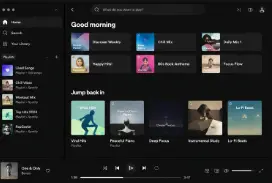
The platform gives users access to a huge music library without needing to buy individual songs. Free users can listen with ads, while premium subscribers get extra benefits such as offline downloads and ad-free listening.
One reason many people choose it is its strong music streaming app experience. The service learns from listening habits and recommends songs, artists, and playlists that match personal tastes.
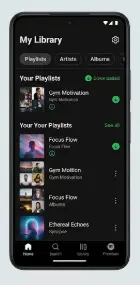
Key Features
Personalized Recommendations
The recommendation system studies listening habits and suggests songs that match your taste. Over time, recommendations usually become more accurate, helping users discover new artists without spending hours searching.
This feature matters because it saves time and keeps music fresh. Many listeners find favorite songs through automatic suggestions rather than manual searches.
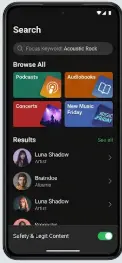
Massive Music Library
The platform offers access to millions of songs across many genres and languages. Whether you enjoy pop, rock, classical music, hip-hop, or local artists, there is usually something available.
A large library means users rarely need multiple music services to find what they want. Everything stays organized in one account.
Podcast and Audiobook Support
Music is only part of the experience. Users can also follow podcasts and, in some regions, access audiobook content through the same app.
Having different audio content in one place makes daily listening easier. You can switch from a music playlist to an educational podcast in seconds.
Offline Listening
Premium subscribers can download content for offline playback. This feature is especially useful during travel, flights, or situations with poor internet access.
Downloaded content helps reduce mobile data usage and keeps music available when a connection is unavailable.
Playlist Creation and Sharing
Users can create custom playlists for workouts, study sessions, road trips, or special events. Playlists can also be shared with friends and family.
This makes the service more social and personal. Instead of relying only on pre-made collections, users can build their own listening experience.
Cross-Platform Sync
The platform works smoothly across phones, computers, tablets, gaming consoles, and smart speakers. Progress and playlists stay connected through the same account.
This feature supports a better audio streaming service experience because users can move between devices without losing their place.
How to Use Spotify — Step by Step
Works on: Android, iOS, Windows, macOS, web browsers, smart TVs, and smart speakers.
Requires: Internet connection, account registration, and a compatible device.
- Download the application from the official website or app store.
Installing from trusted sources helps ensure you get the latest version and security updates. - Create an account or sign in.
You can register with an email address or use supported sign-in options. - Search for music, artists, albums, or podcasts.
The search bar in stopify helps you quickly find content across the platform’s large library. - Start listening and interact with recommendations.
Liking songs and following artists improves the quality of future suggestions in sspotify. - Create playlists for different activities.
Organizing content into playlists makes it easier to find favorite tracks later in sppotify. - Upgrade if you want premium features.
Premium plans unlock benefits such as offline downloads and ad-free playback in sppootify. - Explore the personalized playlist recommendations section.
This area often highlights new songs and artists based on your listening history in spotifyy.
Pros and Cons
The biggest strengths include a huge music catalog, excellent recommendations, support for podcasts, easy playlist sharing, and broad device compatibility. The free version allows users to access a large amount of content without paying, which makes it attractive for casual listeners. The interface is simple enough for beginners while still offering advanced features for regular users.
There are also a few limitations. Free users must deal with advertisements and some playback restrictions. Offline downloads require a premium subscription, and certain songs or audiobooks may not be available in every region because of licensing agreements. Recommendation systems can also become repetitive if listening habits stay very narrow.
Overall, the service is best suited for music fans, podcast listeners, students, commuters, and anyone who wants an easy-to-use digital audio platform.
Is Spotify Safe and Legal to Use?
For most users, the answer is yes. Spotiify is generally considered safe and legal when downloaded from official sources such as the company website, Google Play Store, Apple App Store, or trusted device marketplaces.
The service is operated by a well-known company with millions of users worldwide. Official apps receive regular updates that address security issues, improve performance, and add features. User accounts also support security options such as password protection and account management tools.
From a malware perspective, the biggest risk comes from downloading modified or unofficial versions from third-party websites. Those versions may contain harmful code, unwanted software, or account security risks. Sticking to official downloads greatly reduces these concerns.
Legally, using the official platform for streaming licensed content is allowed in supported regions. Problems can arise only when users rely on unauthorized modified versions that bypass subscriptions or licensing rules.
For the safest experience, download only from official sources, keep the app updated, and avoid unofficial modifications or account-sharing practices that violate service terms.
Top Alternatives to Spotify
Apple Music
Apple Music is a subscription-based music platform with a large song library and strong integration with Apple devices. It differs by focusing more heavily on the Apple ecosystem and offering a different recommendation approach.
YouTube Music
YouTube Music combines official tracks, music videos, remixes, and user-uploaded content. It differs because it connects closely with YouTube and often provides access to rare versions of songs.
Amazon Music
Amazon Music offers streaming plans and integration with Alexa-enabled devices. It differs by providing extra value for users already invested in Amazon services and smart home products.
FAQ — People Also Ask
Is Spotify free to use?
Yes, a free version is available. Users can listen to music, podcasts, and playlists without paying, but advertisements are included. Some playback features may also have limitations compared to premium plans.
Can Spotify work without internet?
Yes, but offline listening requires a premium subscription. Users can download songs, playlists, and other supported content in advance and play them later without an active internet connection.
How many songs are available on Spotify?
The platform offers access to a very large catalog with tens of millions of tracks. The exact number changes over time as new music is added and licensing agreements evolve across different regions.
Is Spotify available on PC and mobile devices?
Yes. The service supports Android phones, iPhones, Windows computers, macOS systems, tablets, smart TVs, gaming consoles, and web browsers. Your account data stays synchronized across supported devices.
Is Spotify Premium worth it?
For people who listen daily, premium can be a good value. Benefits such as ad-free playback, offline downloads, improved control over listening, and better convenience often make the upgrade worthwhile.
Conclusion
Finding music should be easy, enjoyable, and personal. That is exactly where Spotify stands out. Its huge content library, smart recommendations, playlist tools, and support for many devices make it one of the strongest audio platforms available today.
While the free version has some limits, many users will find plenty of value even before upgrading. If you want a simple way to discover new music, follow podcasts, and keep your favorite audio in one place, give Spotify a try and see how it fits your daily routine.









Leave a Reply